 COPIER
How to Scan Receipts for Taxes (and What the IRS Accepts)
You can scan receipts for taxes and keep the files instead of the paper, as long as the scans are legible, complete, and organized so you can find any one of them again. The IRS says electronic records have to meet the same requirements as paper ones. This guide covers what that means in practice, what each receipt should show, how to scan W-2s and 1099s, and a folder system that makes tax time quicker. It describes US federal rules; your state, your tax preparer or your lender may ask for more.
Does the IRS accept scanned receipts?
Yes. IRS Publication 583 covers electronic records under “Kinds of Records To Keep.” It says that all requirements that apply to paper books and records also apply to electronic storage systems, and that the system must index, store, preserve, retrieve, and reproduce the records in a legible format. The detailed rules are in Revenue Procedure 97-22, which Publication 583 points to.
The same section says original paper records may be destroyed once the electronic system has been tested to show it reproduces them correctly, with procedures to keep it that way. The IRS can test the system too. For a household or a sole proprietor, the plain reading is: every scan has to be readable, complete and findable, and you need to be able to produce a copy when asked.
What each receipt has to show
The IRS page What kind of records should I keep lists what supporting documents for business purchases and expenses should identify. A till receipt covers some of it; the rest can come from another document.
| The record should show | On a typical receipt? | If it’s missing |
|---|---|---|
| Payee (who you paid) | Yes, the shop’s name | Write it on the receipt before scanning |
| Amount paid | Yes | Use your card or bank statement |
| Proof of payment | Sometimes (card type, last digits) | Scan the matching statement line |
| Date | Yes | Use your statement |
| Description of what you bought | Often only item codes | Add it to the file name, or note it on the receipt |
The IRS notes that a combination of documents may be needed to support one expense, so a receipt plus a statement line is fine. If you write on a receipt, do it before you scan.

How to scan receipts so they hold up
- Scan soon. Most till receipts are thermal paper and fade. Scan within days, not at the end of the year.
- Flatten the receipt on a dark, plain surface, in even light, with the flash off.
- Fill the frame. Hold your phone straight above it so the small print is sharp. For a long receipt, scan it in two parts with a little overlap.
- Use black and white for plain print. It makes faint text darker and keeps files small. Use color when a stamp, signature or highlight matters.
- Zoom in and check the payee, date, amount and items before you move on, and retake any scan that isn’t sharp.
- Name it the same way every time (see below).
For more on long, crumpled and faded receipts, see how to scan receipts.
How to scan tax documents like W-2s and 1099s
Forms that come in the mail are easier than receipts, because they’re printed on normal paper:
- Scan every page. Some 1099 statements from brokers run to several pages. Keep them in one document, in order.
- Scan both sides if anything is printed on the back. See how to scan double-sided documents for an easy way to keep the order right.
- Keep a copy of your filed return. The IRS page on how long to keep records says to keep copies of filed returns, because they help with future returns and with an amended one.
- Save PDFs you receive as PDFs. If your employer or bank already gives you a PDF, keep that file. It’s sharper than a scan of a printout.

How to store receipts digitally: a folder system
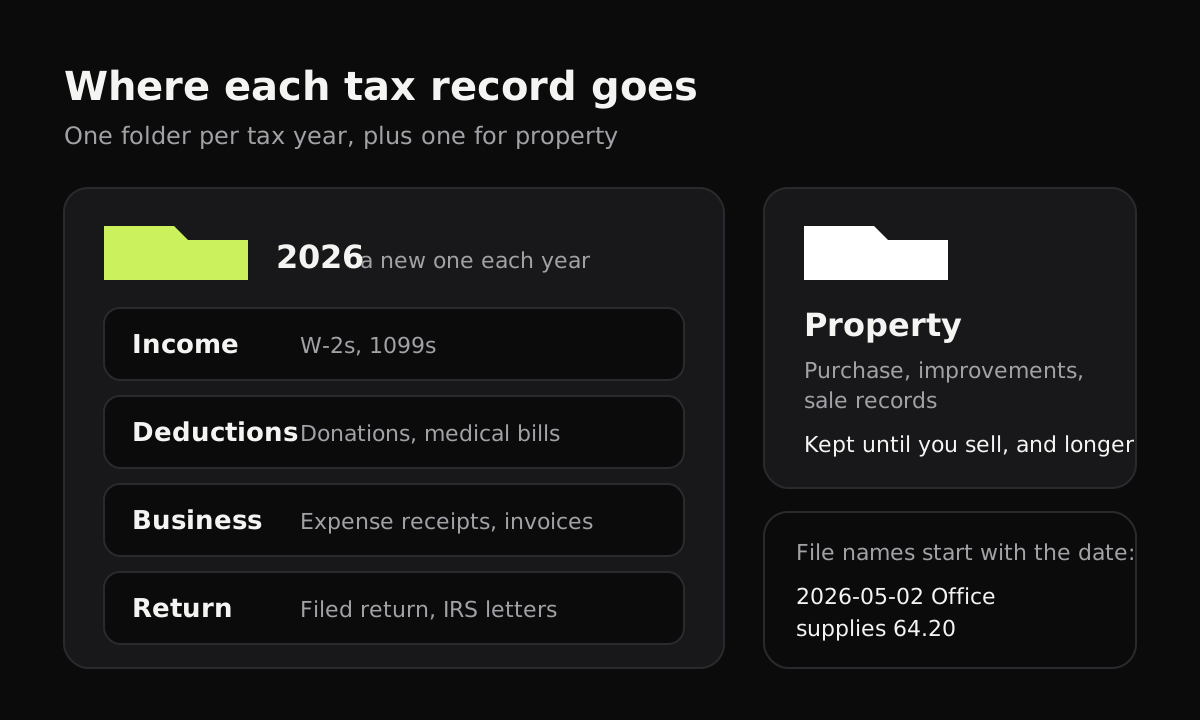
The IRS suggests organizing supporting documents by year and by type of income or expense. A simple version of that, with file names that sort by date:
| Folder | What goes in it | Example file name |
|---|---|---|
| 2026 / Income | W-2s, 1099s, other income statements | 2026 W-2 Employer name |
| 2026 / Deductions | Donations, medical bills, other deductible costs | 2026-03-12 Food bank donation 50.00 |
| 2026 / Business | Receipts and invoices for business expenses | 2026-05-02 Office supplies 64.20 printer paper |
| 2026 / Return | The return you filed and any IRS letters | 2026 Form 1040 as filed |
| Property (no year) | Purchase, improvement and sale records for a home or other property | 2026-08-30 Roof replacement invoice 9,400.00 |
Property gets its own folder because those records are kept until the period of limitations ends for the year you sell the property, which can be decades after you bought it. The full list of periods is in how long to keep tax documents.
How to keep receipts for taxes without losing them
A scan on one phone is a single copy. If the phone is lost or breaks, so are your records. Whatever you scan with, keep a second copy: on a computer, an external drive, or cloud storage you already trust. Do it at the end of each month, or each time you file.
Also think about who sees your receipts. Tax files hold your income, your address, the last digits of your cards, sometimes your medical spending. Some scanner and expense apps upload every page to their servers. That can be convenient, but it’s worth knowing before you scan years of records into one.
Scanning tax receipts with Copier
Copier scans on your phone or in your browser and keeps everything on the device: no account, no uploads, no analytics. It finds the receipt, straightens it, and cleans it up, and Black & white gives crisp print in a small file. Batch mode lets you scan a pile of receipts one after another, and you can rename each document with the date, payee and amount and search for it later.
Share pages as JPG for free (up to 10 documents), or as PDF with Copier Pro, a one-time purchase. Copier has no cloud backup and doesn’t read the text on receipts, so share your files to your own folders or drive for the backup step above.
Habits that make tax time easier
- Scan as you go. Five receipts a week is easier than a shoebox in April.
- Write the purpose on business receipts before scanning: “client lunch, J. Smith” is the description the IRS asks for.
- Match big receipts to statements each month, and scan the statement line if the receipt is unclear.
- Ask your tax preparer what they want and in what format. Many are happy with a folder of PDFs.
- Don’t shred originals you might need for other reasons, like a warranty or an insurance claim. The IRS page on keeping records notes that insurers and creditors may need records longer than the IRS does.
Questions
Does the IRS accept scanned receipts?
Yes. IRS Publication 583 says electronic records must meet the same requirements as paper ones, and the system that stores them must be able to index, store, preserve, retrieve and reproduce them in a legible format.
Can I throw away paper receipts after scanning them?
Publication 583 says the original paper may be destroyed once your electronic system has been tested to show it reproduces the records correctly and you have procedures to keep it that way. In practice, check every scan is readable and complete first, and keep originals your tax preparer, insurer or lender asks for.
How long should I keep scanned tax receipts?
Generally until the period of limitations for that return runs out, which is usually 3 years after you file. Some situations need 6 or 7 years, and property records are kept until the period runs out for the year you sell the property.
What should a receipt show for taxes?
For business purchases and expenses, the IRS says supporting documents should show the payee, the amount paid, proof of payment, the date, and a description that shows what it was for. A card statement can fill in proof of payment if the receipt doesn't.
Should I scan my W-2 and 1099 forms?
It's a good idea. Scan each form when it arrives and keep it in the folder for that tax year, next to a copy of the return you filed. The IRS recommends keeping copies of filed returns.