 COPIER
Best DPI for Scanning Documents (With Pixel Sizes)
The best DPI for scanning documents is 300. It’s sharp enough for small print and text recognition, the files stay a reasonable size, and it’s the minimum that US federal agencies must use, under National Archives rules, when they digitize ordinary paper records. Go up to 400 DPI for documents with fine detail, 600 DPI for photos you want to enlarge, and down to 150 or 200 DPI only for pages you’ll just read on screen.
DPI means dots per inch: how many pixels the scanner records along each inch of paper. Scanner software usually calls it DPI, while archives and standards say PPI (pixels per inch). For a scan they mean the same thing.
What DPI to scan documents at, by use
These settings cover almost everything you’ll scan at home or for work.
| What you’re scanning | DPI | Why |
|---|---|---|
| Pages you’ll only read on screen or email | 150 to 200 | Readable text, small files |
| Letters, forms, contracts, receipts | 300 | Sharp small print, good for OCR |
| Text documents for long-term records | 300 minimum | The National Archives minimum for modern paper records |
| Fine print, maps, drawings, photo prints | 400 minimum | The National Archives minimum for photographic prints and paper with fine detail |
| Photos you want to print larger | 600 | A 4×6 inch print becomes 2,400 × 3,600 pixels, enough for an 8×12 print at 300 DPI |
| 35 mm slides and negatives | 2,400 to 4,000 | A 36 mm frame is only 1.42 inches wide; at 2,400 DPI that’s about 3,400 pixels |
The US government figures come from 36 CFR 1236.50, the rule federal agencies follow when they digitize records so the paper can be destroyed. It’s a good benchmark for your own important papers too. The rule also notes that raising the PPI setting on a device doesn’t always add real detail, which is worth remembering with cheap scanners and phone cameras.
Pixel sizes of A4 and Letter at each DPI
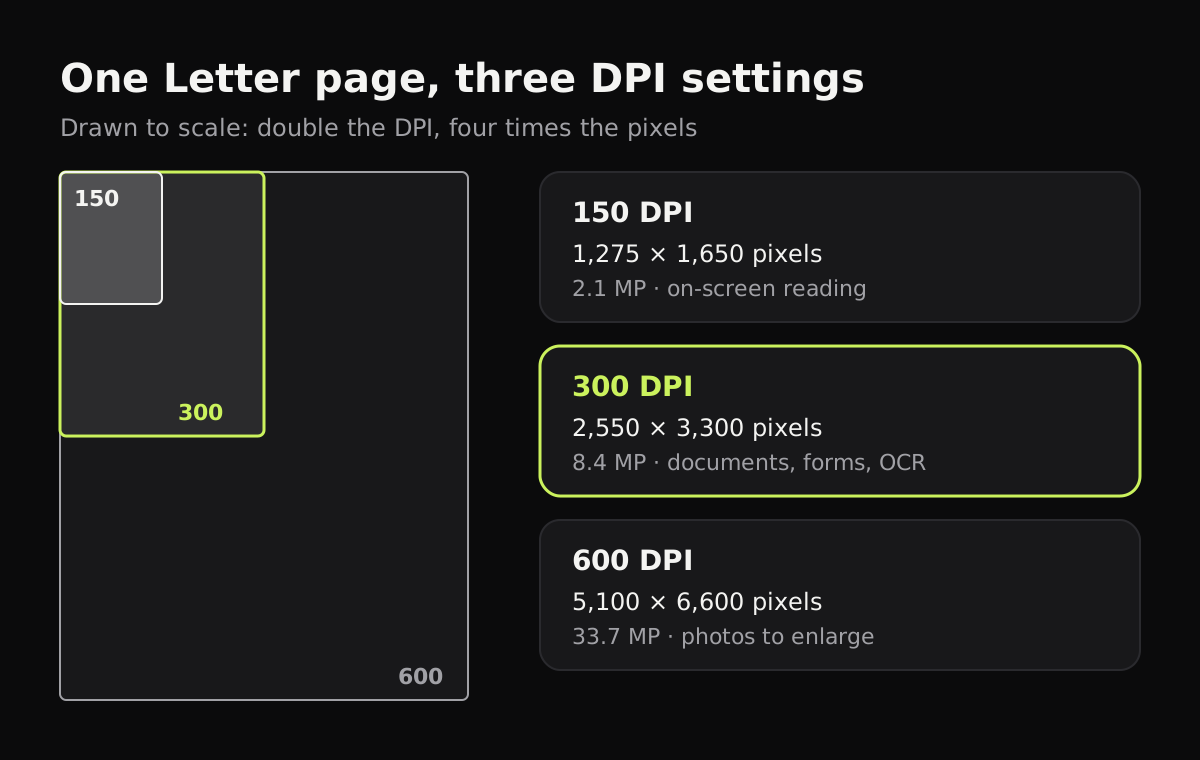
A DPI setting turns into a fixed number of pixels. These are exact for A4 (210 × 297 mm, which is 8.27 × 11.69 inches) and US Letter (8.5 × 11 inches):
| DPI | A4 in pixels | A4 megapixels | Letter in pixels | Letter megapixels |
|---|---|---|---|---|
| 150 | 1,240 × 1,754 | 2.2 | 1,275 × 1,650 | 2.1 |
| 200 | 1,654 × 2,339 | 3.9 | 1,700 × 2,200 | 3.7 |
| 300 | 2,480 × 3,508 | 8.7 | 2,550 × 3,300 | 8.4 |
| 400 | 3,307 × 4,677 | 15.5 | 3,400 × 4,400 | 15.0 |
| 600 | 4,961 × 7,016 | 34.8 | 5,100 × 6,600 | 33.7 |
Doubling the DPI quadruples the pixels, because both the width and the height double. That’s why a 600 DPI scan is about four times the file size of the same page at 300 DPI, for a document that doesn’t look any different when you read it.
What resolution does a phone scan have?
A phone doesn’t have a DPI setting, but you can work it out. A 12-megapixel camera takes photos of 4,032 × 3,024 pixels. If a Letter page exactly fills the frame, its 8.5-inch width spans the 3,024 pixels, which is 3,024 ÷ 8.5 = about 356 DPI. (Its 11-inch length would allow 4,032 ÷ 11 = 367, so the width is the limit.)
In practice the page fills less of the frame, because you leave a margin around it. At 80% of the frame, that’s about 285 DPI. The same sums for other cameras:
| Camera | Letter page filling the frame | Filling 80% of the frame |
|---|---|---|
| 12 MP (4,032 × 3,024) | 356 DPI | 285 DPI |
| 24 MP (5,712 × 4,284) | 504 DPI | 403 DPI |
| 48 MP (8,064 × 6,048) | 712 DPI | 569 DPI |
So a phone held reasonably close gets you roughly 300 DPI, the same as a scanner’s document setting. The difference is in the light and the lens: a scanner lights the page evenly and keeps it flat, while a phone photo can have shadows, glare and a tilted page. A scanner app fixes most of that. Copier straightens each page, including curled ones, and evens out the light so the paper is white, and our guide to getting clean scans covers the rest.
To get the most resolution from a phone, fill the frame with the page while keeping all four corners in view, hold still, and use good light so the camera doesn’t have to blur detail away in low light.
DPI and file size
Higher DPI means bigger files, but the color setting changes the size even more. A page scanned in black and white at 300 DPI is far smaller than the same page in color. If an upload form limits files to a few megabytes, lower the DPI to 200, switch to black and white, or both. Black and white vs color scans compares the sizes, and how to make a scanned PDF smaller covers shrinking a file you already have.
Quick settings to remember
- Everyday documents: 300 DPI, black and white or grayscale.
- Anything with color that matters, like stamps or a signature in blue ink: 300 DPI in color.
- Photos: 600 DPI in color; 400 is the archive minimum.
- Slides and negatives: 2,400 DPI or more, on a film scanner or a flatbed with a film holder. See how to scan film negatives with a phone for the low-cost route.
Questions
What is the best DPI for scanning documents?
300 DPI. It keeps small print sharp, works well for text recognition and is the minimum US federal agencies must use under National Archives rules when digitizing ordinary paper records. Use 200 DPI if you only need to read the page on screen.
Is 600 DPI better than 300 DPI for documents?
Not for ordinary text. A 600 DPI scan has four times the pixels and a much bigger file, but text that's sharp at 300 DPI doesn't get more readable. Use 600 DPI for photos you want to enlarge or for very fine detail.
What DPI do I need for OCR?
300 DPI is the usual choice. Below about 200 DPI, small type starts to lose detail and text recognition makes more mistakes.
What DPI is a phone scan?
It depends on the camera and how much of the photo the page fills. A Letter page that fills a 12-megapixel photo works out to about 356 DPI; filling 80% of the frame, about 285 DPI.