 COPIER
Is CamScanner Safe? Its Record and What to Check
Is CamScanner safe? Today’s version isn’t known to contain malware, but it has a documented history. In 2019 security researchers at Kaspersky found a malicious module in CamScanner’s Android app on Google Play, and in 2020 India blocked the app over data security concerns. Its current App Store privacy label also says it collects data that’s used to track you. Here is what happened, with sources, and how to judge CamScanner or any other scanner app yourself.
What Kaspersky found in 2019
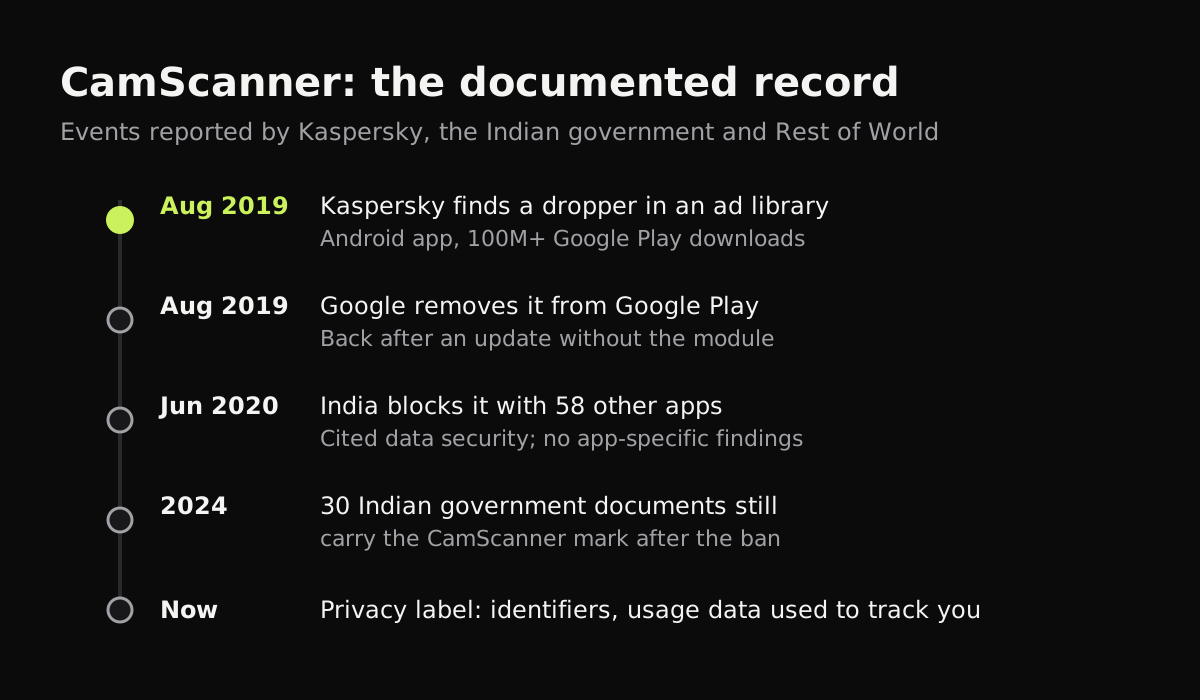
CamScanner is made by INTSIG Information Co., Ltd, and by 2019 its Android version had more than 100 million downloads on Google Play. In August 2019, Kaspersky reported that recent versions included an advertising library with a malicious component, which it detects as Trojan-Dropper.AndroidOS.Necro.n.
A dropper is a small piece of code whose job is to fetch more code. According to Kaspersky, this one decrypted and ran a hidden module from the app’s own files, which then downloaded further modules chosen by whoever controlled it. Those could show intrusive ads or sign people up for paid subscriptions without their knowledge. Kaspersky said CamScanner had been a legitimate app for years and suggested the code came in through an advertising partner. Threatpost’s report quotes its researchers on that point.
Kaspersky passed its findings to Google, which removed CamScanner from Google Play. The developers took the module out, and Kaspersky’s article was later updated to say the app had been restored to the store. The finding concerned the Android app; Kaspersky’s report doesn’t mention the iPhone version.
Why India blocked CamScanner in 2020
On June 29, 2020, during a border standoff with China, India’s government blocked 59 apps with Chinese links, including TikTok and CamScanner, saying they were “prejudicial to sovereignty and integrity of India.” It cited data security and privacy but didn’t publish anything specific about CamScanner. Rest of World reported in 2024 that 30 Indian government documents it found, dated after the ban still carry the “Scanned with CamScanner” mark, and one policy expert it quoted called the ban more political than technical.
So the ban tells you the Indian government didn’t trust the app. It isn’t a finding that the app was stealing documents.
What CamScanner’s privacy label says now
Apple asks every developer to declare what its app collects. At the time of writing, CamScanner’s App Store listing says:
| Category on the label | What CamScanner declares |
|---|---|
| Data used to track you | Identifiers, Usage Data |
| Third-party advertising | Device ID, Advertising Data |
| Analytics | User ID, Device ID, Product Interaction |
| App functionality | Email Address, Phone Number, Photos or Videos, User ID, Device ID, Crash and performance data |
| Price | Free with in-app purchases, including weekly, monthly and yearly Premium plans |
“Used to track you” means the app links what it collects with data from other companies’ apps and websites, usually for advertising. Apple shows the label as the developer’s own declaration and notes it hasn’t verified it. The app also offers uploads to cloud services and has accounts, so your documents leave the phone if you use those features.
So, is CamScanner safe?
For a recipe or a flyer, the risk is small. The 2019 problem was removed, the app is in both official stores, and Google and Apple both review apps. For a passport, a tax return or a medical letter, ask yourself whether you want those pages in an app whose label lists tracking identifiers and advertising data, from a company whose Android app once shipped a dropper through an ad library. People reasonably land on both sides of that question.
What we’d avoid outright are modified “premium” CamScanner APKs from download sites. They’re a common way to get real malware.
How to check any scanner app
These checks take five minutes and work for any app, including ours.
| What to check | Where to look | A good sign |
|---|---|---|
| What it collects | App Store privacy label, Google Play Data safety | “Data Not Collected”, or nothing under tracking |
| Whether it works offline | Scan a page in airplane mode | Scanning, cleaning and saving all still work |
| Whether it needs an account | First launch | You can scan without signing in |
| Permissions | Settings > the app (iPhone), App info > Permissions (Android) | Camera, and photos only if you import |
| Ads | Listing says “Contains ads”, or banners in the app | No ad networks in the label |
| Where your files go | Settings inside the app, the privacy policy | Stored on the phone; cloud upload is opt in |
Our guide to offline scanner apps explains the airplane-mode test in more detail.
A scanner that keeps everything on your phone
Copier finds, straightens and cleans each page on the device. There’s no account and no sign-in, no analytics or ads, and nothing is uploaded. It works offline, and your pages stay on the phone until you share them. The free version scans and shares pages as JPG for up to 10 documents; PDF export and unlimited documents are a one-time Copier Pro purchase. It doesn’t do text recognition or cloud backup.
The built-in options are private too: the Notes and Files scanners on iPhone process pages on the phone (Notes then syncs them to iCloud if you use iCloud for Notes). See CamScanner alternatives for a side-by-side comparison, the best free scanner apps for a wider list, and how to scan a passport for handling the most sensitive documents.
Questions
Is CamScanner safe to use now?
The malicious module Kaspersky found in 2019 was removed from the Google Play version soon after it was reported, and the app is back in both stores. Its App Store privacy label still says it collects identifiers and usage data used to track you, so whether it's safe enough depends on what you scan with it.
Did CamScanner have a virus?
In August 2019 Kaspersky found that some Android versions of CamScanner on Google Play included an advertising library with a malicious dropper, detected as Trojan-Dropper.AndroidOS.Necro.n. Google removed the app, and it returned after an update without the module.
Why was CamScanner banned in India?
On June 29, 2020, India's government blocked CamScanner along with 58 other apps with Chinese links, citing data security and national security. The government did not publish specific findings about CamScanner.
Is CamScanner a Chinese app?
Yes. Its developer, INTSIG Information Co., Ltd, is a Chinese company, which is the listed seller on the App Store.
How can I tell if a scanner app uploads my documents?
Turn on airplane mode, scan a page and save it. If the app works normally, its scanning runs on your phone. Then read its App Store privacy label or Google Play Data safety section for what it collects when you're online.