 COPIER
Best Scanner App for Android: 7 Options Compared
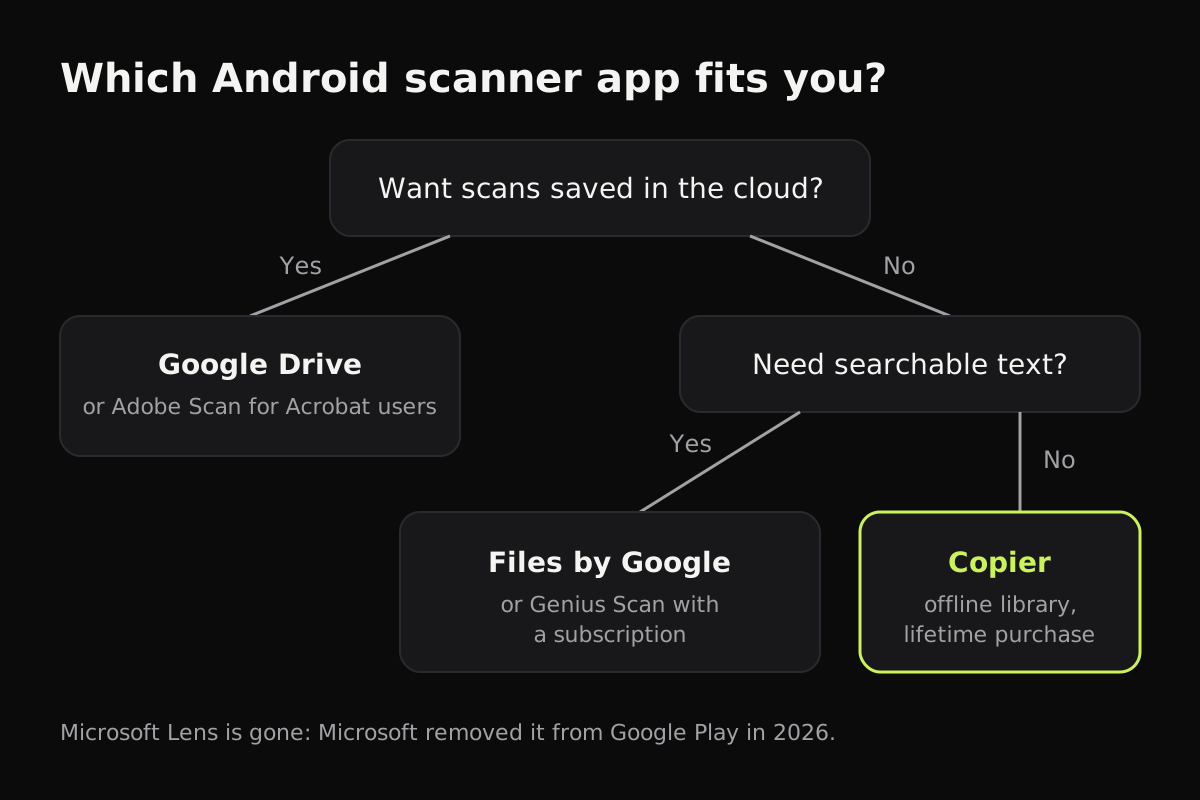
The best scanner app for Android depends on one question more than any other: where you want your documents to live. If you want them in the cloud, Google Drive’s scanner is free and already on most phones. If you want them on the phone, Files by Google makes a free searchable PDF, and an offline app like Copier gives you a private library with no account and no subscription.
There are dozens of document scanner apps on Google Play, and most do the basics well: find the page, straighten it, make the paper white, save a PDF. The differences are in the account, where the file goes, what’s behind a paywall, and how you pay. This comparison covers the seven options most people end up choosing between.
Scanner apps for Android at a glance
The table compares what each app needs and what you get for free. Features and plans change, so check the Play Store listing before you pay.
| App | Account needed | Where scans go | Multi-page PDF free | Text recognition | How you pay for extras |
|---|---|---|---|---|---|
| Google Drive | Google account | Your Google Drive | Yes | Yes, searchable PDF | Free (Google storage) |
| Files by Google | No | On the phone | Yes | Yes, searchable PDF | Free |
| Samsung Camera | No | Gallery, or PDF with Document Scan | On One UI 8.5 | Text extraction | Free, Galaxy only |
| Adobe Scan | Adobe account | Adobe Document Cloud | Yes | Yes, with limits on free | Subscription |
| Genius Scan | No | On the phone | Yes | With a subscription | Subscription |
| CamScanner | For sync | On the phone, optional cloud | With a watermark | With a subscription | Subscription |
| Copier | No | On the phone | No, JPG free; PDF with Pro | Not yet | One-time lifetime purchase |
Google Drive: the free one that’s already there
Drive’s scanner is good. It finds the page, has Auto capture, a Clean tool that removes stains and fingers, filters, and multi-page PDFs. Scans are saved as searchable PDFs in the Drive folder you pick. The trade-off is that every scan is uploaded to your Google account and uses your Google storage. Our Google Drive scan guide has the steps.
Files by Google: free, and saves on the phone
The Files by Google app added a Scan button in 2024. It has the same kinds of tools as Drive (crop, filter, clean, add pages) and saves a searchable PDF in a Scanned folder on the phone, according to Google’s help page. No account and no upload. For an occasional scan, this is the simplest free scanner app on Android. It doesn’t give you much of a library, though: scans are files in a folder.
Samsung’s built-in scanner
Galaxy phones scan from the Camera app. The older Scan button saves a single page to Gallery as an image; Document Scan in One UI 8.5 takes several pages into one PDF, on the Galaxy S26 and on recent flagships that got the update. If you have a Galaxy, try it first. See how to scan on Samsung for where the setting is.
Adobe Scan
Adobe Scan makes clean PDFs with text recognition and fits naturally if you already use Acrobat. You have to sign in with an Adobe account, and scans are saved to Adobe Document Cloud. Some features, such as more text recognition and combining files, are part of a paid plan.
Genius Scan
Genius Scan’s free Basic plan scans, edits and exports without ads, according to its plan comparison. Text recognition, PDF encryption, automatic exports and Genius Cloud sync are in the Ultra subscription. The old Plus Lifetime purchase is no longer sold.
CamScanner
CamScanner has a long feature list, including text recognition and cloud sync. Its App Store listing says the free version is ad-supported and adds a watermark to documents, and the Premium plan is a subscription. If you’re weighing it up, read is CamScanner safe and CamScanner alternatives.
Microsoft Lens is gone
Lens was a popular free choice for years. Microsoft retired it: it was removed from Google Play on February 9, 2026 and stopped scanning on March 9, 2026. Microsoft suggests the scanner in the OneDrive app, which can only save scans to OneDrive, not to the phone.
Copier: offline, no subscription
Copier is our app, so take this section with that in mind. It runs on Android phones, tablets and foldables, on iPhone and iPad, and in the browser, and does all of its work on the device. There’s no account, no analytics, no ads, and nothing is uploaded.
The camera outlines the page live and, with Auto on, takes it once you’ve held still for about a second; Batch keeps the camera open for a stack of pages. Each page is cut out and straightened, including pages that curl, and cleaned up with one of three looks: Auto (white paper, no shadows, color kept), Black & white (crisp text, small files) or Original. Fingers at the edge of the page are painted out. Every page keeps its original photo, so you can re-crop or change the look later.
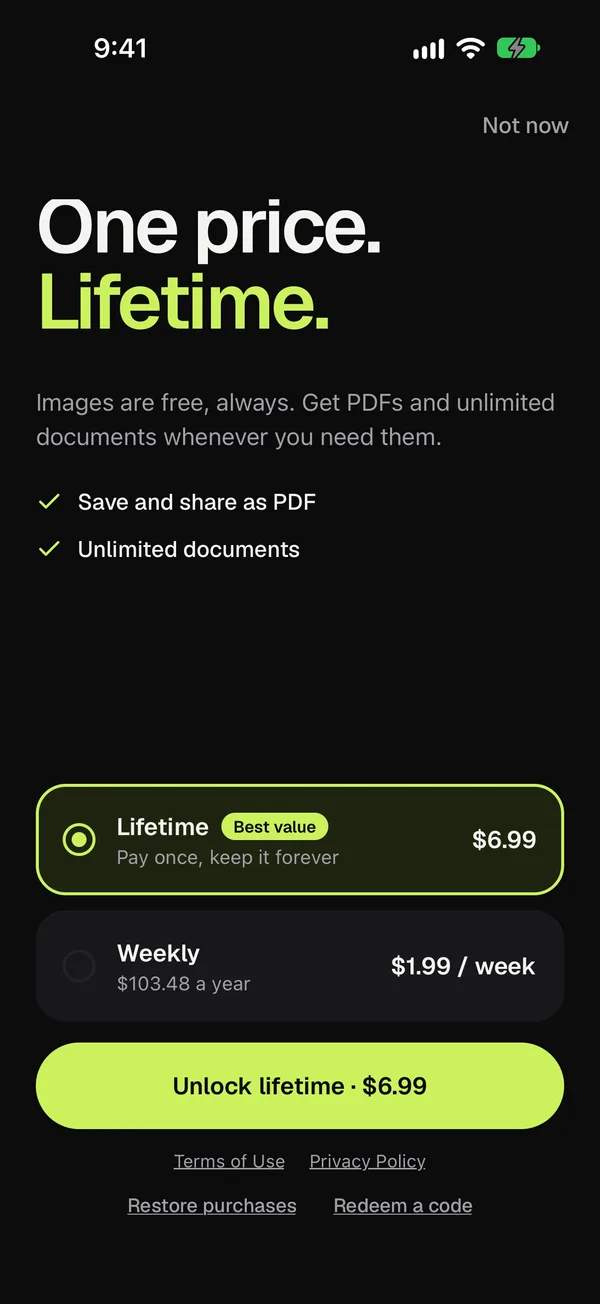
Scanning and sharing pages as JPG is free for up to 10 documents. Copier Pro adds PDF export and unlimited documents, and its main offer is a one-time lifetime purchase. What Copier doesn’t do yet: text recognition, cloud backup, or signing PDFs. If you need searchable text today, Files by Google or Drive will serve you better.
How to pick a scanner app for Android
- If you already keep everything in Google Drive and scan the odd form, use Drive’s scanner and skip the extra app.
- If you want a free scan on the phone with searchable text, use Files by Google.
- If you scan sensitive papers often, look for three things: no account, processing on the device, and a price you pay once. Document scanner apps without a subscription goes into that.
- Whatever you choose, scan one real page before you commit. Look at a shadowed page and a page with small print, and check what the free version puts in the file you share.
Questions
What is the best free scanner app for Android?
For most people, Google Drive or Files by Google, which come with many Android phones, make multi-page PDFs for free. Drive uploads every scan to your Google account; Files by Google saves it on the phone.
Does Android have a built-in document scanner?
Not in Android itself, but Google's own apps do. Google Drive and Files by Google both have a Scan button, Pixel phones offer Scan document in the camera, and Samsung phones have a Scan button in the Camera app.
What happened to Microsoft Lens?
Microsoft retired it. According to Microsoft's support page, Lens was removed from Google Play on February 9, 2026 and stopped scanning on March 9, 2026. Microsoft points users to the scanner in the OneDrive app, which saves scans to OneDrive.
Which Android scanner app doesn't need an account?
Files by Google, the Samsung Camera, Genius Scan's free version and Copier all scan without signing in. Google Drive needs a Google account and Adobe Scan needs an Adobe account.