 COPIER
How to Scan Medical Records and Keep Them Private
To scan medical records at home, sort the papers by person and provider, take out the staples, and scan each letter or report as one multi-page document in good light, then name each file with the date, the provider and what it is. If you don’t have the papers, you have a legal right under HIPAA to ask your providers for copies, usually including an electronic copy. And because these are some of the most private papers you own, it’s worth choosing a scanner that keeps them on your device.
Getting copies of your medical records
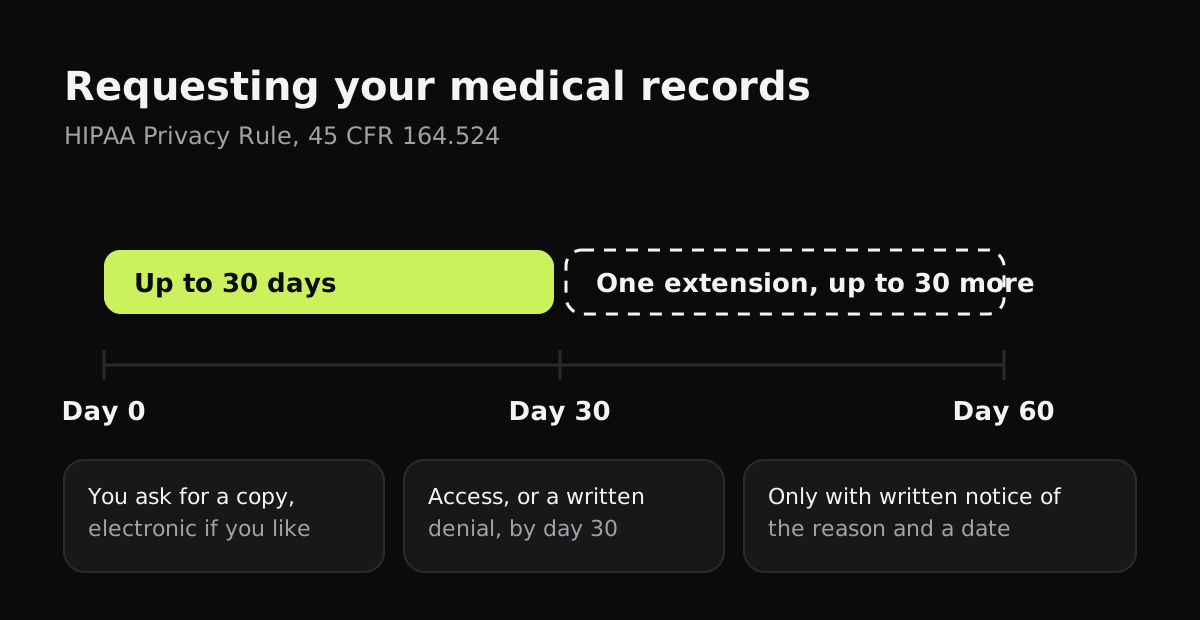
Before you scan, check whether you can get the records electronically, which saves you the scanning. In the US, the HIPAA Privacy Rule gives you the right to see and get a copy of your health information from doctors, hospitals, clinics and health plans. The rule itself is 45 CFR 164.524, and HHS explains it for patients on its right of access page. The main points:
| Your right | What the rule says |
|---|---|
| Time to respond | 30 days from your request, with one extension of up to 30 more days if they tell you in writing, within the first 30, why and when |
| Format | The form and format you ask for, if they can readily produce it, including an electronic copy; otherwise a readable copy you agree on |
| Sending to someone else | They must send a copy to a person you name, if you ask in a signed, written request |
| Fees | A reasonable, cost-based fee for copying labor, supplies and postage only |
| Patient portal | Many providers already show test results, visit notes and letters there, which you can download |
So the easiest route is often the provider’s patient portal, then a request form from their records office asking for an electronic copy. Keep the scanning for the papers you already have at home: old letters, printed results, records from a practice that has closed, or a relative’s papers you’re looking after.
How to scan medical records at home
- Sort first. Separate the papers by person, then by provider, then put each pile in date order. It’s far easier than renaming files afterwards.
- Take out staples and paper clips, and flatten folded letters with your hand or under a book.
- Keep documents together. A three-page discharge summary should be one file with three pages, not three files.
- Use good light. Near a window in daylight, flash off, with no shadow from your phone or hand across the page.
- Black and white for printed pages. It gives sharp text and small files. Use color for anything where color matters: charts with colored lines, photos, or highlighted results.
- Check each page before you move on. Lab results are full of small numbers; zoom in to make sure they’re legible.
- Name each file with the date (year first), the provider and what it is: 2026-03-14 Dr Lee blood test results.

How to organize scanned medical records
A folder for each person, then folders for each provider or kind of record, works for most households. File names that start with the date keep everything in order inside each folder.
| Folder | What goes in it | Example file name |
|---|---|---|
| Person / Primary care | Visit summaries, referrals, letters | 2026-03-14 Dr Lee visit summary |
| Person / Tests and imaging | Lab results, scan reports | 2026-03-14 Blood test results |
| Person / Specialists | Letters and reports from each specialist | 2025-11-02 Cardiology clinic letter |
| Person / Hospital | Admission and discharge papers | 2025-06-20 Discharge summary |
| Person / Medications and vaccines | Prescriptions, vaccination records | 2024-10-05 Flu vaccine record |
| Person / Insurance and bills | Explanations of benefits, bills, receipts | 2026-04-01 EOB knee MRI |
Keep medical bills and receipts in the same structure. If you deduct medical expenses, they’re tax records too: see how to scan receipts for taxes.
Where to keep them: on your device or in the cloud?
Medical records carry diagnoses, medications, your insurance details and often your date of birth and address. HIPAA’s rules apply to your providers and health plans; once a copy is yours, what happens to it depends on where you put it. A scanner or health app you choose yourself usually isn’t covered by HIPAA, so read what it does with your pages.
Some things to weigh:
- On your device: private, and works offline, but a single copy. Use a passcode, and keep a backup on a computer or an encrypted drive.
- In cloud storage: easy to reach from anywhere and to share with a carer, but the files sit on someone else’s servers. Turn on two-step sign-in.
- In a scanner app that uploads pages: convenient, but check whether pages are processed on a server, kept there, or used for anything else.
Scanning medical records with Copier
Copier scans on your phone or in your browser and never uploads your pages. There’s no account, no analytics and no ads, and the app works offline. Each page is found, straightened and cleaned up on the device.
Scan a whole letter or report with Batch so each page lands in the same document in order. Pick Black & white for printed results, and with Apply to all pages on, one choice covers every page. Name the document with the date, provider and what it is, and find it later by searching your library. Share it as JPG for free (up to 10 documents) or as a PDF with Copier Pro, a one-time purchase.
Copier doesn’t back up or sync, so for medical records, which you’d hate to lose, share your PDFs to a backup you control. It also can’t search the text inside a scan yet, which is one more reason to name files carefully.

Tips
- Scan new papers as they arrive. A letter scanned the day it comes is filed in a minute.
- Keep originals of anything legal or official, such as an advance directive or a signed consent, alongside the scan.
- Ask for electronic copies of anything new: you can usually download it from the portal.
- Share only what’s needed. A new specialist rarely needs every record; send the relevant letters and results.
- Look after a relative’s records in their own folder, and keep any authorization you hold for them with it.
For sending records to a new doctor, see how to email a scanned document. For more on going paper-free at home, see how to go paperless.
Questions
Do I have a right to copies of my medical records?
Yes. Under HIPAA, doctors, hospitals and health plans generally have to give you a copy of your records when you ask, in the form you request if they can produce it, including an electronic copy.
How long does a provider have to send my medical records?
Under the HIPAA Privacy Rule, a provider has 30 days to act on your request. It can take one extension of up to 30 more days if it tells you in writing, within the first 30 days, why and when you'll get them. State law can set a shorter time.
Can a doctor charge me for copies of my medical records?
They can charge a reasonable, cost-based fee, which may cover the labor of copying, supplies such as paper or a USB drive, and postage. Ask for the fee before they make the copies.
Is it safe to store medical records on my phone?
It can be, if your phone has a passcode and the app keeps files on the device. Check whether a scanner or health app uploads your pages, since HIPAA covers your providers and health plans, not usually the apps you choose yourself.
How should I organize scanned medical records?
Make a folder for each person, then one for each provider or type of record, and start every file name with the date written year first. That way records sort by date and you can find a test result in seconds.