 COPIER
How to Scan Sheet Music So It Prints and Reads Well
To scan sheet music, flatten each page in even light, scan it in black and white with a phone scanner app or a flatbed at 300 to 600 dpi, and save the pages in order as one PDF. Straight staff lines matter more than anything else: a page that curves toward the spine bends the staves and makes the music tiring to read. If you want the scan to play back, you also need an OMR app, which reads the notes.
Musicians scan music for a few different reasons: to read from a tablet, to print a clean copy for a rehearsal, to save a fragile old edition, or to turn it into an editable score. The scanning steps are the same; what you do afterward differs.
Sheet music sizes
Printed music comes in more sizes than office paper, and it matters when you print the scan or set up a tablet. These are the common ones.
| Size | Dimensions | Where you’ll see it |
|---|---|---|
| US Letter | 8.5 × 11 in (216 × 279 mm) | Home-printed music, many digital downloads in North America |
| A4 | 210 × 297 mm (8.3 × 11.7 in) | Most printed and downloaded music outside North America |
| 9 × 12 in | 229 × 305 mm | Many instrumental parts and band and orchestra music, a size J.W. Pepper calls preferred for parts |
| Choral octavo | about 7 × 10.5 in, varies by publisher | Choir pieces |
| Tabloid / A3 | 11 × 17 in / 297 × 420 mm | Large conductor’s scores |
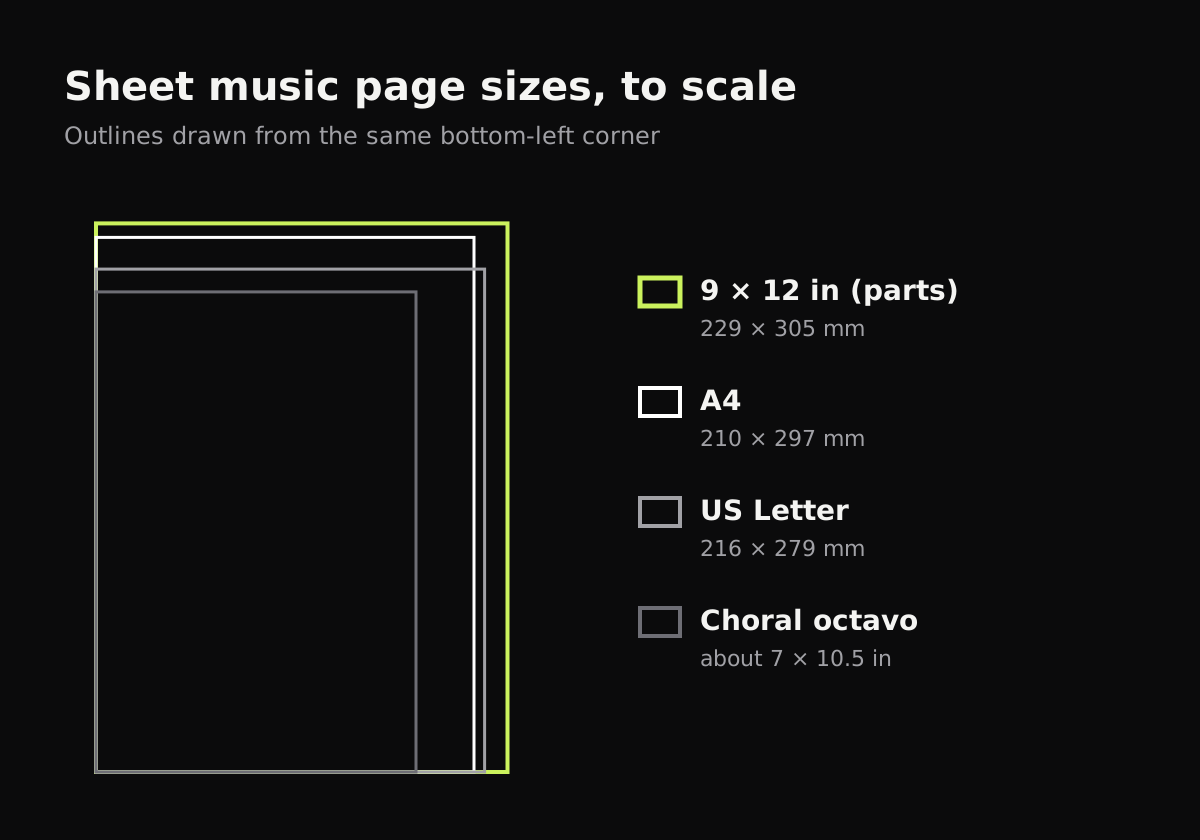
A 9 × 12 inch part printed on Letter or A4 paper gets scaled down a bit. That’s usually fine for reading, but check that small dynamics and fingering numbers are still legible.
How to scan sheet music with your phone
- Flatten the music. Loose sheets go flat on a dark table. For a bound book, open it fully and press the pages down at the outer edges, or put a weight on the margins.
- Light it evenly. Daylight from a window to one side works well. Avoid a lamp right above you, which puts the phone’s shadow on the page.
- Switch the scanner to batch or multi-page mode so you can scan the whole piece in one go.
- Hold the phone parallel to the page and fill the frame. The staff lines are the giveaway: if they converge toward one end, you’re holding the phone at an angle.
- Pick black and white. Notes, stems and staff lines are all black ink, so black and white gives the sharpest result and the smallest file.
- Check every page for cut-off systems at the bottom and blurred notes, and retake those.
- Save as one PDF named after the piece and the part, like “Elgar Nimrod, Viola”.
The built-in scanners do this well: Notes or Files on iPhone (Scan Documents), and Google Drive on Android. Both put several pages into one PDF. See how to scan multiple pages into one PDF for each device’s steps.
Scanning music with Copier
Copier follows each edge of the page, and when an edge bows, as pages from a bound book do, it straightens the page along the curve rather than only by its corners. That keeps staff lines closer to straight than a four-corner crop. Use Batch so the camera stays open, and pick B&W; tap it again for a strength slider if thin staff lines break up or the background still looks gray. Hold Compare to check against the photo.
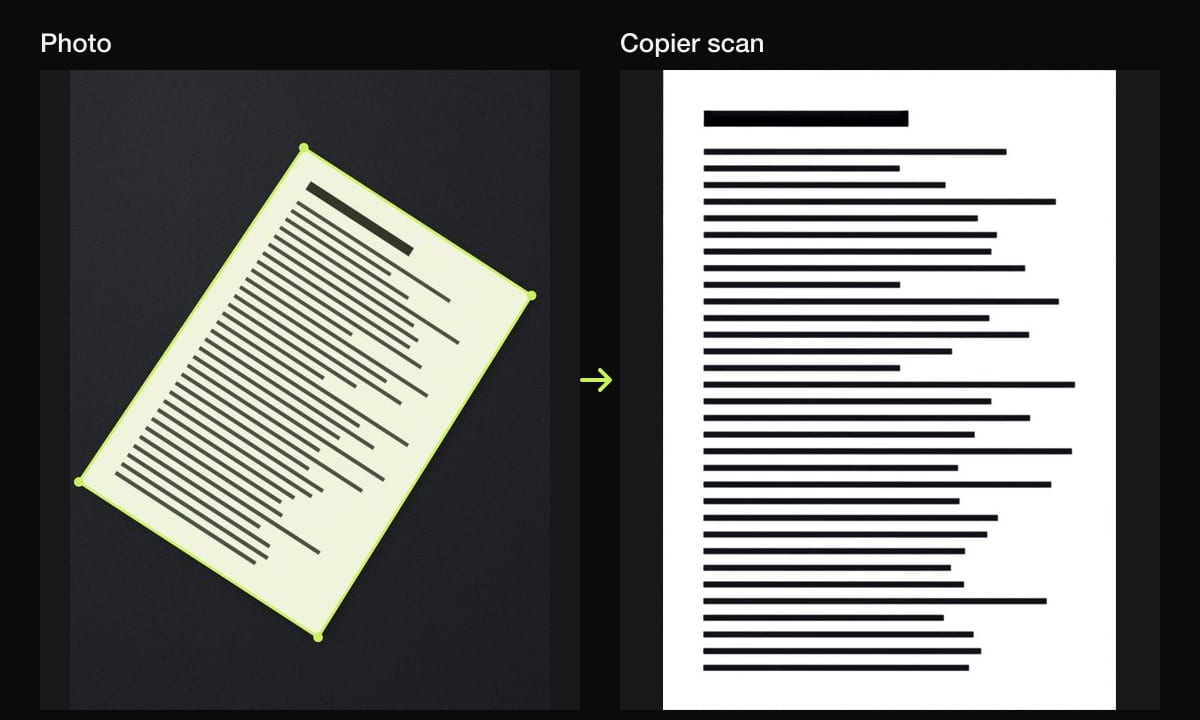
Copier’s PDF puts each page on an A4 sheet, turned to landscape for wide pages, so a Letter or 9 × 12 page is scaled to fit. Sharing pages as JPG is free; PDF export is part of Copier Pro.
How to scan sheet music on a flatbed
A flatbed gives the sharpest result for loose pages:
- Use black and white (sometimes called “line art” or “text”) or grayscale at 300 dpi for reading and printing, and 600 dpi if you plan to use OMR or restore a damaged page.
- A page larger than the glass needs two scans, which is awkward to join. A phone handles big pages more easily.
- Don’t press a bound volume flat on the glass. You’ll crack the spine and still get a dark, curved strip near the binding.
Scan, then read it on a tablet
Most musicians who scan music read it from a tablet. PDF apps made for musicians, such as forScore on iPad and MobileSheets on Android, add page-turn pedals, annotations and setlists. For a tablet, crop the margins tight so the music is as large as possible on the screen, and keep each piece as its own PDF.
Turning a scan into playable or editable music
A scan is an image. To hear it, transpose it or edit it, the notes have to be recognized, which is called optical music recognition (OMR).
- PlayScore 2 reads printed music from your phone’s camera or a PDF and plays it back.
- Audiveris is free, open-source OMR software for the computer. It turns a scan into MusicXML that notation programs like MuseScore can open.
- Commercial desktop OMR programs exist too, with better accuracy on complex scores.
OMR works best on clean, printed music scanned straight, at 300 dpi or more. Handwritten manuscripts and old, faded editions often need a lot of correcting afterward.
A note on copyright
In the US, music published in 1931 or later may still be under copyright. Scanning your own copy to read from a tablet is common, but sharing scans with the rest of the ensemble usually isn’t allowed unless the publisher says so. Public domain editions are on sites such as IMSLP, so check there before you scan an old piece.
Tips for cleaner music scans
- Erase old pencil markings first if you want a clean master copy; scan once before erasing if they matter.
- Scan the whole piece in one session so every page has the same light and size.
- Put the part name and page count in the file name.
- For printing double-sided parts, see how to scan double-sided documents.
Books of music have the same curve problem as any book: how to scan books goes into more detail. For choosing the look, black and white vs color scans explains the difference.
Questions
What is the best way to scan sheet music?
Scan each page flat in even light, in black and white at 300 to 600 dpi or with a phone scanner app, and save the pages in order as one PDF. Keep the staff lines straight by pressing the page flat or using an app that corrects curved pages.
Can I scan sheet music and have it play back?
Yes, with optical music recognition (OMR). Apps such as PlayScore 2 read printed music from a photo and play it, and desktop tools like Audiveris convert scans to MusicXML you can open in notation software.
What size is sheet music?
There's no single size. Much printed music is US Letter or A4, many instrumental parts are 9 × 12 inches, and choral octavos are around 7 × 10.5 inches, depending on the publisher.
Should I scan sheet music in color or black and white?
Black and white for printed music, because notes and staff lines come out crisp and the files are small. Use color only if the page has colored markings you need to keep.