 COPIER
PDF vs JPG: Which Should You Scan To?
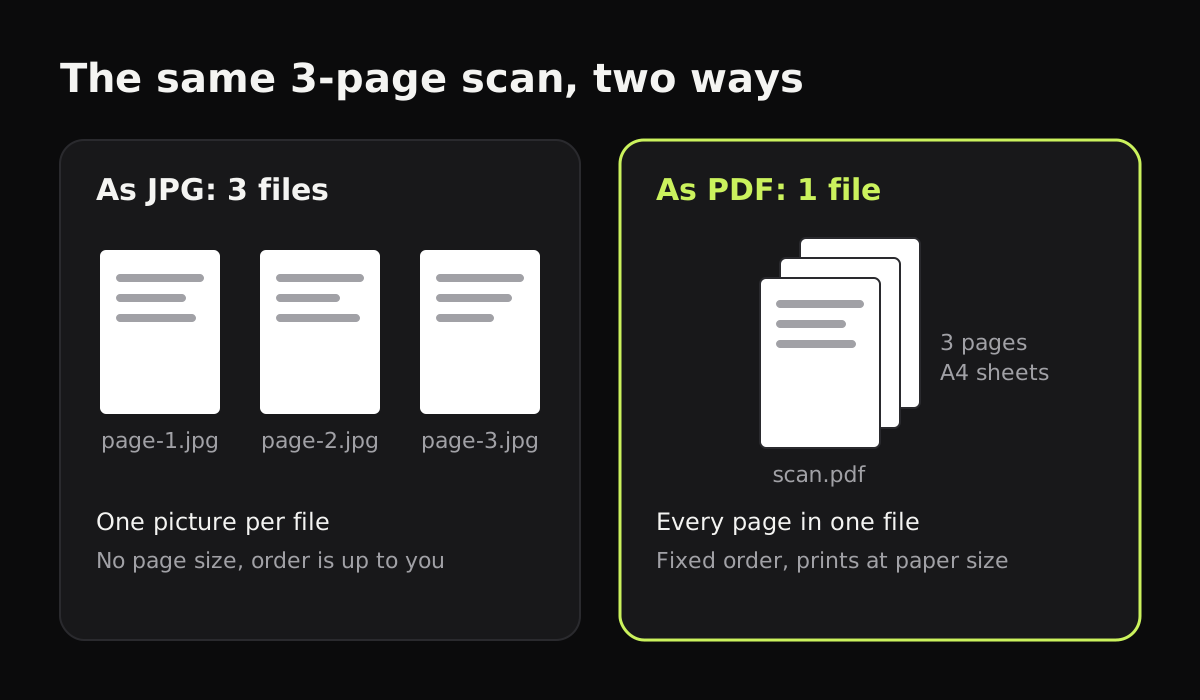
The difference between PDF and JPG comes down to pages. A JPG is one picture. A PDF is a document: it can hold many pages, each with a paper size, and those pages can contain images, text or both. For scanned documents, PDF vs JPG usually means one file with every page in order against a separate image per page.
So for most paperwork, scan to PDF. Use JPG when you need a single image, such as a photo, something to paste into a chat or a slide, or an upload form that only takes pictures. The table and sections below go through the differences in more detail.
PDF vs JPG at a glance
How the two formats compare for scanned pages:
| JPG (JPEG) | ||
|---|---|---|
| Pages per file | Any number | One |
| Paper size | Each page has one, such as A4 or Letter | None, just pixels |
| What’s inside | Images, text, vector graphics, form fields | Pixels only |
| Compression | Depends on what’s inside; scans usually hold JPEG images | Lossy JPEG |
| Size of a scanned page | About the same as the JPG of that page | Depends on resolution and color |
| Searchable text | Possible, if the scanner adds recognized text | No |
| Fill in, sign, annotate | Yes, in a PDF editor | Only by drawing on the image |
| Printing | Prints at its paper size | The printer has to guess the size |
| Opens on | Any phone, computer or browser | Any phone, computer or browser |
| Best for | Documents, forms, multi-page scans | Photos, single images, web and chat |
What a JPG is good at
JPG (also written JPEG) is the standard format for photos. It compresses an image by throwing away detail your eye is unlikely to notice, which keeps files small. Every phone, computer, browser and chat app shows a JPG instantly, and almost every upload form accepts one.
For a scan, JPG is handy when:
- You need a single page as a picture, for example to paste into a message or a slide.
- An upload form asks for an image, which some visa, school and job portals do.
- You’re scanning a photo or drawing rather than a document.
The downsides show up with more than one page. Three JPGs are three files, the person receiving them has to keep them in order, and when they print one, the printer has no idea whether it was a receipt or an A4 letter. Each time a JPG is edited and saved again, it also loses a little more detail.
What a PDF is good at
A PDF describes pages. Each page has a fixed size, and on it you can place text, drawings, form fields and images. That’s why a PDF looks the same on every device and prints at the right size.
A PDF from your phone’s scanner is usually a set of JPEG images, one per page, wrapped in a PDF. Copier does exactly that: each page’s JPEG goes into the PDF unchanged and is fitted on an A4 sheet, turned to landscape for a wide page. So the PDF is about the same size as the JPGs, with the same quality.
Some scanner apps also add a hidden text layer from text recognition, which makes a PDF searchable. Copier doesn’t do text recognition yet; Google Drive and Files by Google do.
Use PDF for:
- Anything with more than one page: contracts, statements, forms, homework.
- Documents someone will print or sign.
- Documents you’ll archive, since one file per document is easier to find later.
Should I scan as PDF or JPG?
Scan as PDF when you’re sending or keeping a document. Scan as JPG when the result is a picture or the place you’re sending it only accepts images. When in doubt, a scanner app that keeps the pages lets you share the same scan both ways, so you can decide later.
In Copier, a saved document can be shared as JPG (free) or as PDF (with Copier Pro, a one-time lifetime purchase). Nothing is uploaded either way; the file is made on your device and goes only where you share it.
Is PDF or JPG better quality?
For a scanned page, neither. The quality was set when the page was photographed and compressed; wrapping it in a PDF doesn’t change it. Two things do matter:
- Resolution. A page at 300 dpi has four times the pixels of one at 150 dpi. See best DPI for scanning documents.
- Color. A black and white scan keeps text crisp and is usually smaller than a color one. Black and white vs color scans compares them.
A PDF made from a Word document or a web page is a different case: its text is stored as text, so it stays sharp at any zoom and the file is tiny.
Converting between PDF and JPG
You can go either way with built-in tools. To turn a JPG into a PDF, print it to the PDF printer on your device, as described in how to save a picture as a PDF. To get a JPG from a PDF page, export the page as an image from a PDF viewer such as Preview on a Mac, or take a screenshot. Neither direction adds detail that wasn’t in the scan.
Which format to choose
- A one-page form to email: PDF.
- A ten-page contract: PDF, one file.
- A receipt for an expense app: whatever the app asks for; many take JPG.
- A photo, a drawing or a page for a slide: JPG, or PNG if it has sharp lines and you need it lossless. JPG vs PNG for scans explains when that’s worth it.
- An upload portal: check the accepted formats and the size limit first. If a PDF is too big, make the scanned PDF smaller.
Questions
Should I scan as PDF or JPG?
Scan documents as PDF, especially anything with more than one page or anything someone will print. Scan as JPG when you need a single image, such as a photo, a picture for a website, or an upload form that only accepts images.
Is a PDF or a JPG better quality?
For a scanned page they are usually the same, because most scanner apps put JPEG images inside the PDF. A PDF made from a Word document is sharper, since its text is stored as text rather than pixels.
Is a PDF smaller than a JPG?
Not for scans. A scanned PDF holds one image per page, so it is about the size of those images added together. It only comes out smaller if the app compresses the images more when it makes the PDF.
Can I convert a JPG to a PDF and back?
Yes. Print a JPG to a PDF printer to wrap it in a PDF, and export or screenshot a PDF page to get an image back. Converting back and forth doesn't add detail, and saving a JPG again loses a little each time.