 COPIER
How to Scan Handwritten Notes With Your Phone
To scan handwritten notes, lay each page flat in even light, scan it with your phone’s document scanner, and pick the right look for the ink: a color look for pencil and highlighters, black and white for dark pen. Batch mode lets you go through a whole notebook in a few minutes. If you need to search the words later, you also need text recognition, which is a separate step.
Handwriting is harder to scan than print. Pencil is gray, not black. Ballpoint is thin and uneven. Lined paper has its own blue lines competing with your writing, and a notebook never lies flat.
How to scan notes with the built-in scanner
Every phone already has a free document scanner, and it works fine for notes:
- On iPhone and iPad, open Notes, start a note, tap the Attachments button (the paper clip) and choose Scan Documents. On iOS 26 you can pick a filter and the flash before you shoot. Tap Keep Scan after each page, then Done. The Files app has the same scanner under the More button. Apple’s steps are on its scanning support page.
- On Android, open Google Drive, tap the Camera button, and take each page. Tap Add for the next page, then Done, and save it as a PDF or JPG. See how to use Google Drive scan for the full steps.
Both apply a filter that tries to make the paper white. They don’t let you tune how strong the cleanup is, which is where pencil notes usually go wrong.
Pencil vs pen: which look to use
The look you pick decides whether faint strokes survive. This chart sums it up.
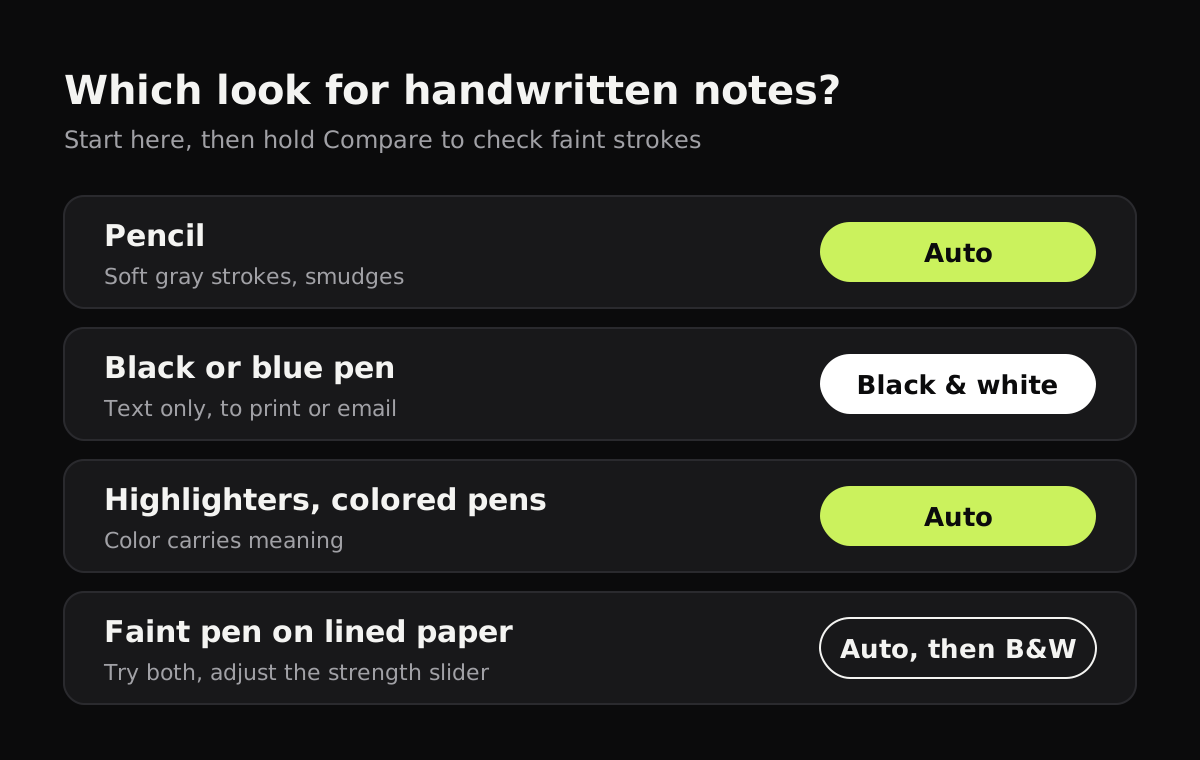
This table gives the best look for each kind of note and the reason for it.
| Notes written in | Best look | Why | Watch out for |
|---|---|---|---|
| Pencil | Color (Auto) | Keeps gray strokes as gray instead of forcing them to black or white | Smudges show more after the paper turns white |
| Black or dark blue pen | Black and white | Crisp, high-contrast text | Very thin ballpoint can break up at a high strength |
| Highlighters, colored pens | Color (Auto) | The colors often mean something (headings, corrections) | Yellow highlighter is faint in any look |
| Faint pen on lined paper | Try both | Black and white may thin out light ink along with the ruled lines | Hold Compare to check before you save |
| Diagrams with shading | Color (Auto) | Shading needs the in-between grays | Hard shadows across the page |
A black and white look works by deciding, for every pixel, whether it’s ink or paper. Dark pen is easy. Light pencil sits close to the paper’s own brightness, so some strokes end up on the paper side and vanish. A color look evens out the paper without making that choice, so the pencil stays.
How to scan handwritten notes in Copier
Copier is a scanner app for iPhone, iPad, Android and the web that does all of this on your device, without an account.
- Tap Scan and switch to Batch if you have more than one page. The page’s outline appears around it as soon as it’s in view.
- Hold the phone above the page. With Auto capture on, Copier takes the page after you’ve held still for about a second. Turn the page and it waits for the next one.
- Pick a look on the Enhance screen. Auto keeps color and makes the paper white. B&W gives the crispest text. Tap the picked look again to get a strength slider.
- Hold Compare to see the page before its look. If a pencil line is missing, move the slider back until it returns.
- Leave Apply to all pages on if every page is in the same ink. Turn it off to give one page, say a pencil diagram, a different look.
- Save, then share as JPG or PDF.
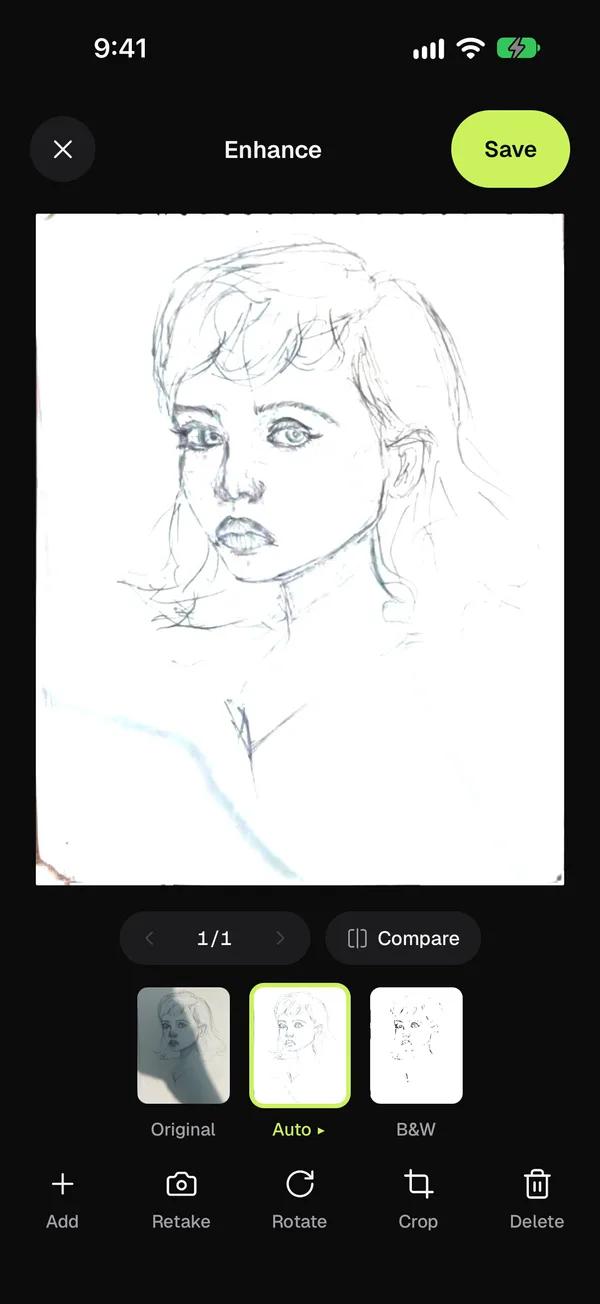
Copier also straightens each page along its edges, so a page that curls up from the notebook comes out flat, and it removes fingers holding the page at its edge. Sharing as JPG is free for up to 10 documents; PDF export needs Copier Pro, a one-time purchase.
Scanning a spiral notebook or bound journal
Notebooks are the awkward part, because the pages won’t lie flat on their own.
- If the notebook has perforations, tearing the pages out gives you the cleanest scan by far. Scan them in a stack with Batch mode.
- With a spiral notebook, fold the cover all the way back so one page lies flat. Keep the spiral outside the frame, or crop it off afterward with Crop.
- In a bound journal, scan one page at a time and press the page flat near the spine with your fingertips at the very edge. The guide on how to scan books covers curved pages in more detail.
- For pages written on both sides, scan all the fronts, then all the backs, or flip each page as you go. Either way, check the order before you save. There’s more on this in how to scan double-sided documents.
Can you search handwritten notes after scanning?
A scan is a picture of your writing. To search it or copy the words, something has to read the handwriting first, which is called OCR (optical character recognition). Copier doesn’t do this yet. These tools do:
- Live Text on iPhone, iPad and Mac lets you select and copy text in a photo or image. It reads neat handwriting reasonably well and messy handwriting badly.
- Google Lens on Android (and in the Google app on iPhone) can copy handwritten text from an image.
- Apple Notes searches text inside documents scanned into a note.
- Handwriting note apps such as GoodNotes and Notability index handwriting they’ve recognized, which helps if you’re moving your paper notes into one of them.
For more on getting words out of a scan, see how to scan text from an image.
Tips for readable note scans
- Have the light come from the side. Your body and phone cast a shadow when the light is behind you. A window to one side is ideal.
- Use a dark table. White notebook paper on a white desk makes the page edges hard to find.
- Fill the frame. Hold the phone close enough that the page takes up most of the screen. More pixels on the page means sharper handwriting.
- Scan right after class or a meeting. Pencil smudges more each time the notebook is opened.
- Name the document by date and subject, like “2026-11-04 Biology lecture 9”. It’s what you’ll search for later. If you’re scanning school work, how to scan homework has tips on submitting it.
Questions
What is the best way to scan handwritten notes?
Use a scanner app on your phone in good, even light, with the page flat on a darker surface. Pick a color look for pencil or highlighters and black and white for dark pen.
Can I make handwritten notes searchable?
Only with text recognition (OCR). Live Text on iPhone and Google Lens on Android can read neat handwriting from a scanned image, and note apps such as Apple Notes and GoodNotes can search handwriting they have recognized.
Why does pencil disappear when I scan it?
Black and white looks turn every pixel into ink or paper, and light pencil can fall on the paper side. Use a color look such as Auto, or lower the cut-off with the look's strength slider.
How do I scan a spiral notebook?
Tear the pages out along the perforation if you can. If not, scan one page at a time with the notebook open flat and the spiral kept out of the frame, then crop the page edge.